%20(4).png)
Essential Tools and Equipment for an Effective School Makerspace
- Makerbazar
- Sep 10, 2025
- 6 min read

Updated: Sep 11, 2025

Creating a school makerspace is an exciting opportunity for students to engage in hands-on learning and spark their creativity. This space serves as a hub for project-based learning, tinkering, and exploration. In this post, we will explore the essential tools and equipment needed to establish an effective school makerspace, ensuring students have access to the resources they need to bring their imaginative ideas to life.
Tools & Equipment
In the context of a student, all items which are used to build a part of a project but doesn't become a part of the project, are categorised under Tools & Equipment. These items are procured one time and are used to multiple years with some maintainance. These would consume most part of your initial Makerspace setup budget but investing in these would greatly uplift the experiance of learners and outcomes of their projects.
Machines & Power Tools
The category majorly contains tools for cutting, grinding, joining, shaping and drilling various types of materials. A few important machine and power tools for your makerspace are listed below:
Laser Cutter: This is the most useful tool for a makerspace. tool for making models, enclosures, structures etc. The machines cuts a sheet (metal, plastic, wood, paper, leather, ceramics etc) into well defined parts which can be assembled to build prototypes.
3D Printer: A must have machine which makes 3d models out of plastic, wood or metal wires. A 3D printer can print literally anything you wish, be it part of your robot, a dental structure, a model of an organ, a gearbox and more.
CNC Router: It is a reverse of 3D printer in which the model is carved out by machining a block of wood, metal or plastic. The possibilities are little lesser but outcomes can be more detailed than a 3D printer.
Power Tools: These machines are necessary for quick processing of a materials, say for ex. cutting a sheet in 2 pieces; drilling a few holes; joining two parts. All are majorly electricity powered but manually operated, namely, Table Saw, Scroll Saw, Band Saw, Foam Cutter, Drill Press, Glue Gun, Soldering Iron, Grinder etc.
Check out the collection of power tools here: https://makerbazar.in/collections/power-machines


Hand Tools
Similar to power tools, hand tools are used for cutting, shaping, joining etc. but require much more effort. The major reason for keeping hand tools handy is for detailed work, quick fixes and low costs. Some of the hand tool categories are:
Cutters: Cutting hand tools are handheld instruments designed to shear, slice, or trim a variety of materials, including wood, plastic, metal, and wire. Tools like hand saw, utility knife, wire strippers, pipe cutters, tin snips, bolt cutters etc.
Hammers: A hammer is a hand tool used to deliver impact for tasks like driving nails, shaping metal, or breaking. Hammers
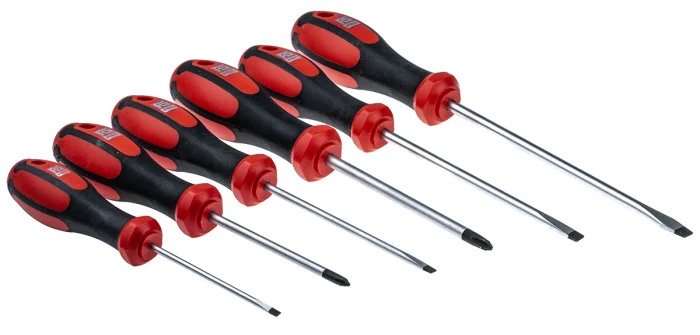
Screwdrivers: Screwdrivers are a type of hand tool used for the insertion and removal of screws. Designs vary based on the area of application and type of screws, namely, philips head, flathead, allen (hex), precision, ratcheting, magnetic, multi-bit.
Pliers: Pliers are a hand-operated tool used for gripping, twisting, bending, and cutting various materials. Wire stripping pliers, Needle-nose pliers, Combination pliers etc.
Chisels: A hand tool with a characteristically shaped cutting edge used for carving hard materials like wood, stone, and metal. Bench chisels, Bevel-edged chisels, Paring chisels, Framing chisels are a few woodworking chisels. Flat chisels, Cross-cut (or cape) chisels, Round-nose chisel are a few metal working chisels.
Clamps: Hand clamps are fastening tools that hold or secure objects together to prevent movement, essential for tasks like woodworking, metalworking, and gluing.
Spanners (Wrench): A hand tool used for gripping, turning, and applying torque to rotary fasteners like nuts and bolts. Open-end spanner, Ring Spanner, Adjustable, Socket, Allen are a few types of spanners.
Find your choice of hardware tools here: https://makerbazar.in/collections/hardware




Testing & Measuring Tools
All projects prototypes require some level of accuracy to function properly be it the shape, dimensions or any electronic feature. Testing tools help in achieving that accuracy through prcise measurements. Various testing tools are available to help us measure different parameters:
Metal-Body Triangle Double Sided Scale Ruler
Calipers
Micrometers
Measuring Tape
Multimeter
Oscilloscope
Tester
Tachometer
Spectrometer
Find a variety of measuring tools here: https://makerbazar.in/collections/measuring-tools




Consumables & Components
Hardware Supplies
Makerspace is all about making prototypes and whats are prototypes without materials. Hardware supplies include different sizes of:
MDF Boards
Wooden Plank Boards
Wooden Dowel Sticks
Acrylic Sheets
PVC Foam Boards
PVC Pipes and Joints
Metal Clamps
Hinges
Find a variety of prototyping materials here: https://makerbazar.in/collections/prototyping
Fastners & Glues
These parts are used to join to parts together through a fixed or removable joint. These include namely:
Screws: Self-Tapping screws, bolts, set screw, socket screw etc.
Nuts: Hex nut, nyloc nut, coupling, wing nut etc.
Adhesive Tapes: Transparent tape, masking tape, duct tape
Solvents & Glues: Super glue, PVA glues, epoxy, cement etc.
Electronic Components
Electronics make up an important part of makerspace projects and add modern features and fuctionalities. Here are a list of electronic components and supplies that would help you build basic to advance electronic functions:
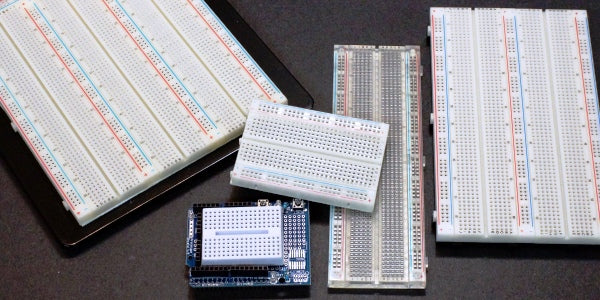
Breadboards & verobaord
Microcontroller boards
Sensors & modules
Motors, actuators & drivers
Switches & relays
Wires, cables & connectors
Batteries, Holders & chargers
Communication
Displays & indicators
Find your preferred electronic components here: https://makerbazar.in/collections/electronics







Softwares & Applications
Design Platforms
Any idea or product is required to be first brought on paper for further consideration by involved stakeholders. For providing better understanding and bringing idea as closer as possible to the final expected product reduces the risks of failure and provide direction for development. A design platform hels in doing just that.
TinkerCAD: Tinkercad is a free, web-based platform for 3D design, electronics, and coding, developed by the software company Autodesk.
Fusion 360: Autodesk Fusion 360 is a cloud-based software platform that integrates 3D computer-aided design (CAD), computer-aided manufacturing (CAM), computer-aided engineering (CAE), and printed circuit board (PCB) design
AutoCAD: AutoCAD is a professional computer-aided design (CAD) software developed by Autodesk, used by architects, engineers, and designers for precise 2D and 3D drafting, design, and modeling
Blender: free and open-source 3D creation suite used for modeling, animation, visual effects, and more
Canva: a versatile, web-based graphic design platform that allows both beginners and professionals to create a wide variety of visual content
Wix: cloud-based website development platform that allows users to create and manage their own websites with an intuitive drag-and-drop interface, AI-powered tools, and a large selection of templates.
Coding Environments
These are a set of tools used to write, test and run a code, may also be called Integrated Development Environment (IDE). It inlcudes code editor, debugger, compiler/Interpreter, build automation, version control integration. Mentioning a few IDE's for kids to enable them develop web, mobile and other software apps.
Arduino IDE: A lightweight editor for MicroPython programs, supporting connecting a board, code upload, file transfer
Blynk: a comprehensive Internet of Things (IoT) software platform for building, deploying, and managing connected devices
Scratch: Scratch is a free programming language and online community where you can create your own interactive stories, games, and animations.
MIT App Inventor: a free, web-based tool that allows beginners to create mobile applications for Android and iOS devices using a drag-and-drop, block-based programming system
Visual Studio Code: a free, powerful, and lightweight source-code editor created by Microsoft.
Google Colab: a free, cloud-based Jupyter Notebook environment that allows users to write and execute Python code in a web browser.
Unity: a versatile real-time 3D development platform used to create a wide range of content, from video games to animated films and architectural visualizationsDocument
Safety Equipment
A makerspace is equipped with complex, heavy and highly powered machines which require multiple precautions to be taken. And while building a makerspace for younger students safety should be the first priority. With necessary supervision in place, all possible gears should be provided to students before operating any machine. A few gears namely are eye glasses, ear buds, masks, aprons, gloves, face shields etc. A collection of safety equipments can be found here: https://makerbazar.in/collections/safety-equipment
Crafting Your Makerspace Vision
Creating a school makerspace requires thoughtful consideration of the tools and equipment that best foster student learning and creativity. By providing essential resources like 3D printers, laser cutters, hand tools, and electronic components, educators can cultivate an innovative and experiential learning environment. An effectively equipped makerspace not only enhances project-based learning but also readies students for future challenges. Investing in these resources is a commitment to nurturing the makers and innovators of tomorrow.


Comments